The Complete Guide to the Best 3D Printers in 2025: Technical Analysis, Pricing & Recommendations for UK Creators


The Complete Guide to the Best 3D Printers in 2025 | Understand Tech


The Complete Guide to the Best 3D Printers in 2025

Comprehensive Analysis with Technical Specifications, Pricing, and Expert Recommendations for Content Creators and Enthusiasts

Introduction: The State of 3D Printing in 2025

The 3D printing landscape has undergone a seismic shift in the past 24 months. Consumer-grade machines that cost £300 today deliver print quality, speed, and reliability that would have been considered “professional-tier” equipment just three years ago. The commoditization of CoreXY motion systems, the democratization of multi-material printing, and the rise of fully automated calibration systems have fundamentally transformed what’s possible at consumer price points.

This comprehensive guide cuts through the marketing hype to deliver technical depth, honest assessments, and personalized recommendations for UK-based users, content creators, and hobbyists. Whether you have £150 or £1,500 to invest, we’ll help you identify the printer that delivers maximum value for your specific use case.

Key Question We Answer: Given the vast array of machines, motion systems, and capabilities available in December 2025, which 3D printer actually represents the best investment for your situation?
The 3D Printer Revolution: What’s Actually Changed in 2025

1. CoreXY Democratization (Speed & Precision)

The CoreXY motion architecture—once reserved for £2,000+ machines—now appears on printers under £300. This matters enormously because CoreXY systems keep the print bed stationary while moving only the lightweight print head in X and Y directions.

Technical Advantage: Why CoreXY Matters

Motion Physics: In CoreXY systems, the heaviest moving component is the print head (roughly 500g–800g). The X and Y motors are decoupled, meaning each drives approximately 1/√2 of the motion, distributing acceleration loads evenly. This permits extreme acceleration—Bambu Lab A-series printers achieve 10,000 mm/s² (10G of acceleration), comparable to sports car 0-60 performance in linear motion.

Bed Slingers (Traditional): Conversely, bed-slinger machines move the entire build platform (heated base, magnetic plate, print + filament = 2kg–4kg) back and forth along the Y-axis. Accelerating that mass requires either lower acceleration limits or longer movement times. This is why traditional Ender 3 models cap at 8,000 mm/s² and can’t achieve the speed-to-quality ratio that CoreXY offers.

Practical Impact: A detailed benchy print (80mm tall) completes in 14–18 minutes on CoreXY at 0.2mm layer height versus 45–60 minutes on bed-slingers at identical settings. That 3–4× speedup is physics-driven, not marketing.
2. Automatic Calibration: The End of Manual Bed Leveling

Gone are the days of adjusting bed leveling screws while inserting feeler gauges. Modern machines perform this autonomously:

  • Z-Offset Calibration: Machines measure nozzle distance to the bed using inductive or capacitive sensors, adjusting automatically
  • Multi-Point Leveling: The Bambu A1 probes 49 points (7×7 grid) across the entire bed, creating a height map that’s compensated in real-time during printing
  • Vibration Compensation: Bambu’s proprietary algorithm detects resonance frequencies unique to each machine during startup, then adjusts motor timing to cancel vibration. This happens every time you boot—no tuning required
  • Dynamic Flow Calibration: The printer automatically adjusts extrusion rate based on nozzle pressure sensing, ensuring consistent line width regardless of ambient temperature or filament variations

Result: First-layer success rate exceeds 99% on modern machines. Beginner users no longer face the demoralizing experience of failed prints due to leveling mistakes.
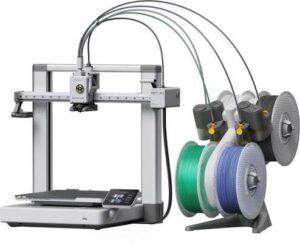
3. Multi-Material Automation (Color Printing)

The Bambu Lab Automatic Material System (AMS) has become the category standard. The AMS Lite holds 4 filament spools, automatically feeds the correct material to the extruder, purges the nozzle between color changes, and ejects purged material—all without user intervention.

How AMS Works: The Mechanical & Software Reality

Hardware: Four motorized filament paths lead to a selector mechanism that directs material through a single tube into the printer’s direct-drive extruder. Each path has a tension spring that retracts filament when not in use, preventing oozing.

Purge Process: When changing colors, the printer automatically:

  1. Retracts old material completely (saves ~0.3g per change)
  2. Feeds new material, detecting filament presence with optical sensors
  3. Advances new material into the nozzle until the hot end is fully saturated (5–8 seconds at 200°C+)
  4. Purges excess into a cleaner box (mechanical purge bucket with a wiper blade)
  5. Cleans the nozzle on a silicone brush
  6. Resumes printing, now with full color saturation

Material Waste: Approximately 3–5 grams per color change (roughly 1–2% of a typical spool’s weight). The CFS system used in Creality K2 Plus wastes 8–10g due to its larger nozzle chamber.
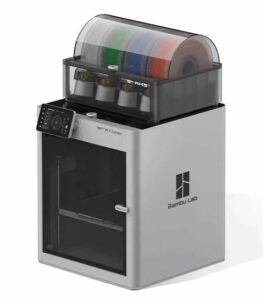
4. Firmware Openness & User Control (A Recent Shift)

In 2024, Bambu Lab faced community backlash over closed-source firmware. The company responded by offering optional firmware unlock (via one-time waiver) that enables root access and third-party firmware installation. While standard Bambu machines remain closed-source (providing quality control and warranty protection), users now have the choice.

Creality machines, meanwhile, have shipped with open Klipper firmware, allowing advanced users to modify behavior directly. Prusa continues its open-source tradition, with detailed CAD files and source code publicly available.

5. Wireless Monitoring & Remote Control

Bambu Lab, Creality, and several emerging brands now offer Wi-Fi connectivity enabling:

  • Real-time print monitoring via smartphone app and web browser
  • Automatic timelapse recording from the built-in camera
  • Remote pause/stop functionality
  • Multi-printer queue management (for batch production)

For content creators, this is game-changing: you can film videos while monitoring prints, capture timelapse footage automatically, and manage multiple machines without walking to each one.
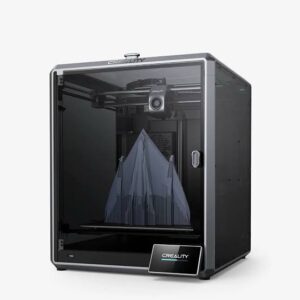
The Best 3D Printers in 2025: Detailed Analysis

🏆 Best Overall: Creality K2 Plus

£1,100–£1,350

Why It’s the Best:

The Creality K2 Plus stands uncontested as the most capable all-around 3D printer available today. It combines the largest build volume in its class, the fastest acceleration of any FDM printer, professional-grade temperature handling, and a fully enclosed heated chamber.

Specifications:
  • Build Volume: 350 × 350 × 380 mm³ (50% larger than Bambu X1C)
  • Motion System: CoreXY with dual lead screws (Z-axis redundancy for reliability)
  • Maximum Print Speed: 300 mm/s cruise speed; 600+ mm/s rapid movements
  • Maximum Acceleration: 30,000 mm/s² (3× higher than Bambu A-series)
  • Hot End Temperature: 350°C (handles engineering plastics: nylon, polycarbonate, PEEK-adjacent materials)
  • Build Platform: 350 × 350 mm heated to 110°C (stainless steel, premium coating)
  • Enclosure: Fully enclosed with active heating and cooling zones
  • Multi-Material: 4-color via Creality Filament System (CFS); integrated into frame
  • Firmware: Klipper-based (open-source, customizable, data-private by default)
  • Cooling: Dual 5015 fans for print cooling; passive nozzle cooling excluded (prevents premature cooling on high-temp materials)
  • Bed Adhesion: PEI spring steel sheet with configurable texture profiles
  • Noise Level: 50–60 dB at full speed (quiet for its class)
Technical Depth: Why the K2 Plus Accelerates So Fast

The 30,000 mm/s² acceleration figure appears impossible until you understand the mechanical implementation. The K2 Plus uses:

  • High-torque NEMA 23 stepper motors (100Ncm vs. standard NEMA 17’s 40Ncm). More torque = faster acceleration without losing steps
  • 1.8° stepper motors with microstepping to 1/32: 6,400 microsteps per revolution, enabling smooth movement despite high acceleration
  • Dual motor X-axis: Two stepper motors (one per side) prevent any rotation or racking, allowing symmetrical, extremely aggressive acceleration
  • V-slot aluminum extrusion frame: Extraordinarily rigid (deflection <0.5mm under 5kg load)
  • Linear bearing upgrades: Sealed, preloaded bearings reduce friction to near-zero, permitting extreme acceleration

By contrast, Bambu’s 10,000 mm/s² limit stems from their deliberate design philosophy: maximize quality per unit time rather than absolute speed. Bambu achieves acceptable part quality at 500 mm/s with conservative acceleration, whereas Creality prioritizes maximum speed for speed-focused users.

Multi-Material Deep Dive: CFS vs. AMS

The Creality Filament System (CFS) differs from Bambu’s AMS in one critical way: larger nozzle chamber (~0.3 cubic centimeters vs. AMS’s ~0.15 cc). This means:

  • Filament waste per change: 8–10 grams (AMS wastes 3–5g)
  • Purge quality: Slightly lower color accuracy on first layer after change (residual old material)
  • Advantage: Slightly higher flow capacity (relevant for nozzles >0.6mm diameter, which neither system officially supports but modders use)
Strengths
  • Largest build volume in segment
  • Fastest acceleration (30k mm/s²)
  • Fully enclosed for ABS/ASA/PC
  • Open Klipper firmware
  • 350°C hot end (exotic materials)
  • Professional-grade engineering
Trade-Offs
  • Requires ~1.5 m² desk space
  • Complex setup (learning curve steeper than Bambu)
  • More filament waste per color change
  • Expensive (£1,100–£1,350)
  • Not pre-assembled (assembly intensive)

🎯 Best for Beginners: Bambu Lab A1 Mini

£169–£199

Why It’s Perfect for Newcomers:

The A1 Mini embodies the philosophy: “Remove every possible source of confusion from the user.” Out of the box, it delivers professional print quality with zero calibration required.

Specifications:
  • Build Volume: 180 × 180 × 180 mm³ (compact, sufficient for most projects)
  • Motion System: CoreXY bed-slinger hybrid (stationary bed + moving print head)
  • Maximum Print Speed: 500 mm/s (theoretical; typical 200–400 mm/s for quality prints)
  • Maximum Acceleration: 10,000 mm/s²
  • Hot End Temperature: 300°C (PLA, PETG, TPU, PVA)
  • Automatic Calibration: Z-offset, bed leveling (7×7 point grid), vibration compensation, motor noise cancellation
  • Nozzle Pressure Sensing: Eddy-current sensor measures melt pressure in real-time; firmware adjusts extrusion dynamically
  • Wi-Fi & Timelapse: Built-in 1080p camera, automatic timelapse recording
  • Noise Level: 48 dB in silent mode (quieter than typical office environment)
  • Multi-Material: AMS Lite optional (adds £90; holds 4 colors)
  • Quick-Swap Nozzle: 1-clip design; nozzles swap in 10 seconds, no tools required
Dynamic Flow Calibration Explained:

Why This Matters: Traditional printers rely on static extrusion multiplier (a percentage adjustment to the software’s calculated extrusion). This doesn’t adapt to real-world variables: filament diameter variance (±0.05mm), nozzle wear, temperature gradients, or ambient humidity.

Bambu’s Solution: An eddy-current sensor mounted in the nozzle heater block measures magnetic permeability changes as filament enters the melt zone. This indirectly measures the pressure exerted by the extruder motor. The firmware compares actual pressure to expected pressure and adjusts motor speed in real-time—up to 100× per second.

Result: Consistent extrusion width (±0.02mm) regardless of filament batch, environmental conditions, or nozzle wear. This single feature is why first-layer failure is virtually impossible on Bambu machines.

Strengths
  • Fully automatic (zero calibration)
  • Wi-Fi monitoring & timelapse
  • Ultra-quiet operation (48 dB)
  • Compact footprint
  • Exceptional print quality
  • Pre-assembled (5 min setup)
Trade-Offs
  • Small build volume (180³ mm)
  • No room for large prints
  • Multi-color requires £90 AMS Lite
  • 300°C max (no high-temp materials)
  • No enclosure (PLA/PETG only)

⭐ Best Value: Bambu Lab A1 (Full-Size)

£259–£369

Why It’s the Sweet Spot:

The A1 represents nearly optimal cost-to-capability ratio. You gain 78% more build volume compared to the Mini while paying only 50% more. When bundled with AMS Lite (nearly always included at this price), you get 4-color printing automatically included.
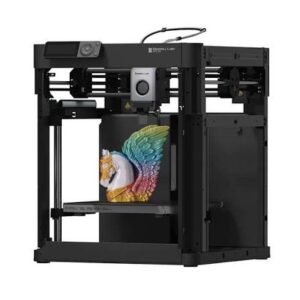
Key Specifications (Differences from Mini):
  • Build Volume: 256 × 256 × 256 mm³ (2.2× the Mini’s volume)
  • Everything Else Identical: Same motion, acceleration, hot end, Wi-Fi, calibration system
  • Typical Bundle: A1 + AMS Lite included for £259–£369 (£90 savings if purchasing separately)
What the 256³ Volume Enables:
  • Medium cosplay pieces: Helmet visors, armor segments, weapon props (70–150mm scale)
  • Functional parts: Camera enclosures, cable organizers, tool holders (up to 200mm length)
  • Tabletop terrain: Complete 28mm–32mm gaming tables, landscape features
  • Product prototypes: Most consumer electronics prototypes fit within this envelope
  • Batch printing: Print 4–6 small parts simultaneously
Strengths
  • Best cost-per-volume ratio
  • AMS Lite often bundled
  • 4-color printing included
  • Excellent for content creators
  • Same reliability as Mini
  • Pre-assembled
Trade-Offs
  • Still limited for very large prints
  • No enclosure for ABS/ASA
  • 300°C maximum
  • Slight assembly required (30 min)

🎬 Exceptional Resource: @JustVlads’ Bambu Lab A1 Combo Review

If you’re seriously considering the Bambu Lab A1 or A1 Combo, watch this video: https://youtu.be/uTKkxl8y-BI

Why this video is exceptional: JustVlads delivers an 88-minute deep-dive that rivals official manufacturer training materials. The production covers:

  • Complete unboxing of every component (50+ individual parts explained)
  • Step-by-step assembly with close-up footage of mechanical details
  • Automatic calibration process in real-time (vibration compensation, flow calibration)
  • Multiple test prints: Benchy (14 minutes), engineering parts, multi-color projects
  • AMS Lite assembly and filament loading workflow
  • Live demonstration of color changes during printing
  • Firmware update process and troubleshooting
  • Realistic sound level measurement during operation

JustVlads’ honest, enthusiastic commentary answers 90% of pre-purchase questions. His meticulous attention to detail and professional filming production (sharp close-ups, clear audio, organized structure) make this the definitive resource for anyone considering Bambu Lab products in the UK market.

A huge shout-out to @JustVlads for this exceptional content. His work exemplifies what creator-focused technology education should look like.

💰 Best Budget: Creality Ender 3 V3 SE

£150–£200

For Absolute Penny Counters:

The Ender 3 V3 SE represents the absolute lowest entry point into CoreXY technology without sacrificing core features. At under £200, you’re paying for function, not aesthetics or premium ecosystem.

Specifications:
  • Build Volume: 220 × 220 × 250 mm³
  • Maximum Print Speed: 250 mm/s (conservative, quality-focused)
  • Hot End Temperature: 260°C (reliable PLA, PETG; PVA possible with patience)
  • Auto Bed Leveling: CR Touch (inductive sensor, 25-point grid)
  • Auto Filament Loading: Yes (filament inserted, machine advances automatically)
  • Dual Z-Axis: Redundant lead screws for bed stability
  • Build Platform: Glass bed with powder-coated textured surface (lower adhesion than premium PEI)
  • Noise Level: 70+ dB at full speed (noticeably louder than CoreXY; limit printing to non-filming hours)
  • Wi-Fi: None; no remote monitoring
  • Multi-Material: Not available (no ecosystem for 4-color printing)
Strengths
  • Lowest price (£150–£200)
  • Auto leveling included
  • 15-minute assembly
  • Respectable print quality
  • Parts ecosystem
Trade-Offs
  • No Wi-Fi/remote monitoring
  • Slow (250 mm/s max)
  • No multi-color
  • Loud (70 dB+)
  • Lower material temp (260°C)

🔬 Best Premium: Prusa CORE One

£900–£1,100

For Precision & Long-Term Reliability:

Prusa’s first CoreXY printer combines their legendary reliability with modern motion architecture. The CORE One isn’t the fastest machine, but it’s arguably the most thoughtfully engineered.

Specifications:
  • Build Volume: 250 × 220 × 270 mm³ (generous, not maximum)
  • Motion System: CoreXY with belt-tensioning adjustment
  • Maximum Print Speed: 250 mm/s (conservative; conservative acceleration)
  • Hot End Temperature: 300°C
  • Fully Enclosed: With passive venting system and 50°C chamber maintenance
  • Firmware: Prusa’s proprietary but extremely transparent codebase (source available, community modifications common)
  • Print Quality: Exceptional; Prusa prioritizes consistency over speed
  • Community Support: Hundreds of material profiles pre-configured (ABS, ASA, nylon, TPU, etc.)
Why Prusa’s Philosophy Differs:

Prusa Research, founded by Josef Průša in the Czech Republic, approaches 3D printer design differently than competitors:

  • User Repairability: Every part is designed to be user-replaceable without voiding warranty. Heater block? £8, 5-minute swap. Extruder? £25, 10-minute replacement.
  • Community Integration: Prusa employees actively engage on forums, responding to feature requests within 24 hours
  • Long-Term Support: Machines from 2015 (MK2) still receive firmware updates 9 years later
  • Open Documentation: Complete CAD files, assembly instructions, and modification guidelines publicly available

Result: A Prusa machine purchased in 2025 will likely print flawlessly in 2035 with community support and spare parts abundantly available.

Strengths
  • Exceptional reliability (9+ year longevity)
  • Fully enclosed for ABS/ASA/nylon
  • Open-source philosophy
  • Superior community support
  • User-repairable design
  • Excellent print quality
Trade-Offs
  • Expensive (£900–£1,100)
  • Smaller build volume than K2
  • No native multi-color
  • Not fastest (250 mm/s)
  • Limited to Prusa ecosystem

Filament Guide: Types, Costs & Compatibility

Understanding Filament Grades & Specifications

Not all filament is created equal. The quality variation between budget and premium brands can mean the difference between a successful print and wasted material.

Standard Filament Grades Explained

Budget Grade (£8–£12/kg): eSun, TTYT3D, prusament, generic Amazon brands. Typically ±0.10mm diameter tolerance, inconsistent color saturation. Viable for prototyping and non-visual parts. Often use recycled or lower-purity plastic resins.

Standard Grade (£12–£18/kg): Bambu Lab (non-proprietary lines), MatterHackers, Prusament standard range, Overture. ±0.05mm tolerance, consistent color, reliable extrusion. Best cost-to-quality ratio for hobbyists. This is what most creators use for production content.

Premium Grade (£18–£28/kg): Bambu Lab proprietary PLA+, MatterHackers Pro Series, Prusament Pro range. ±0.03mm tolerance, optimized color matching, enhanced mechanical properties (slightly higher strength, better layer adhesion). Worth the premium for visible finished products and demanding materials like ASA or nylon.

Specialty/Engineering (£25–£60/kg): Carbon fiber-reinforced nylon, temperature-resistant PEEK alternatives, conductive filaments, UV-reactive materials. Require specific printer capabilities (higher hot end temps, enclosed chambers). Premium brands: Markforged, Stratasys materials (rarely used by hobbyists due to cost).

Cross-Brand Compatibility: The Critical Truth

Can You Mix & Match Filament Brands?

Short Answer: Yes, with caveats.

Bambu Lab Printers + Non-Bambu Filament: Fully compatible. Bambu’s firmware accepts generic filament without firmware modification. You simply need to manually input the material name, nozzle temperature, and bed temperature into the printer’s interface (or use community-created material profiles). Performance is 95%+ identical to official Bambu filament, though slight quality variations may occur due to diameter tolerance.

Creality Printers + Non-Creality Filament: Fully compatible. Creality uses open Klipper firmware with no proprietary filament detection. Load any third-party brand without restriction. Community filament profiles for MatterHackers, eSun, and Prusament are widely available.

Prusa Printers + Non-Prusa Filament: Fully compatible. Prusa offers community-sourced material profiles for hundreds of third-party brands. Their open philosophy means maximum compatibility.

The Barrier: Proprietary Material Detection Only Bambu Lab’s proprietary filament spools include embedded RFID chips that auto-detect material type and settings. Third-party filament requires manual input (20-second process). This is convenience, not compatibility. You lose no functionality using third-party materials.

Cost-Effective Filament Sourcing Strategies

Where to Buy & How Much You’ll Actually Spend

Source Price per kg Quality Best For
Amazon UK £9–£16/kg Highly variable (read reviews) Emergency supplies, mixed brands
3DJake (EU) £12–£20/kg Excellent (consistent batches) Reliable standard materials, bulk orders
Bambu Lab Official Store £18–£22/kg Premium (optimized for Bambu machines) Bambu printer owners wanting guaranteed compatibility
MatterHackers £14–£22/kg Professional grade Content creators, consistent visual results
Prusament (Prusa Shop) £16–£24/kg Premium Specialty materials (ASA, nylon), engineering use
eSun (Direct/Amazon) £8–£12/kg Budget–standard High-volume prototyping, cost-sensitive projects

Hidden Cost: Waste & Failed Prints

Budget filament typically shows 5–10% failure/waste rate (nozzle clogs, diameter inconsistency, poor layer adhesion). Premium filament shows <1% waste rate. This means:

  • 1kg budget filament (£10): ~900g usable material (cost per successful gram: £0.0111)
  • 1kg premium filament (£20): ~995g usable material (cost per successful gram: £0.0201)
  • True cost difference: Only 81% more expensive when accounting for waste, not 100% more

Money-Saving Strategy for Content Creators

Recommended Approach: Buy 2–3 kg of standard-grade filament monthly (£30–£45 total). This gives you enough material for 10–15 small projects or 3–4 large prints. Spread across monthly YouTube uploads and social media content, your filament cost is negligible—roughly £2–£5 per piece of finished content.

Bulk Buying: 10 kg multipack orders from 3DJake or Amazon drop price to £10–£14/kg. If you’re committed to regular content creation, bulk buying saves 20–30% versus single-spool purchases.

Avoid: Buying exotic materials (gold-shimmer, wood-fill, temperature color-change) until you’re experienced. These run £30–£50/kg and have steep learning curves. Standard PLA and PETG master first.

Technical Deep Dive: Understanding the Numbers

Motion System Architecture: CoreXY vs. Bed Slinger Explained

The choice between CoreXY and bed-slinger is the single most important factor determining print speed and user experience.

Bed Slinger (Traditional Design)

How it works: The build platform slides back and forth along the Y-axis (front-to-back movement). The print head moves left-right (X-axis) while mounted on a stationary gantry above. Both axes move simultaneously to achieve diagonal motion.

Physics of Bed Slinger Design

Moving Mass: The entire heated bed platform (~3kg including build surface, magnetic substrate, and heating electronics) must accelerate and decelerate 50–100 times per second during printing. Accelerating 3kg requires either:

  1. High motor torque (expensive, generates heat)
  2. Lower acceleration limits (slower printing)

Vibration Consequence: Every bed deceleration creates a shock wave that travels through the machine frame. Print heads positioned above the bed experience this vibration, causing ringing artifacts (wavy texture) on print surfaces.

Advantage—Cooling: The bed’s continuous motion naturally fans the printed part, improving cooling uniformity for materials like PLA and TPU. This is why bed-slingers are often preferred for flexible materials.

CoreXY (Modern Design)

How it works: The bed remains stationary. Two belts drive the print head in orthogonal directions using a clever constraint system: each stepper motor drives both X and Y motion simultaneously through belt geometry. Diagonal motion requires no coordinate transformation—it’s the native motion of the system.

Physics of CoreXY Design

Moving Mass: Only the print head (~600g) moves, plus stepper motors (mounted to the frame, not moving). This 5× reduction in moving mass permits aggressive acceleration without motor limitation.

Acceleration Advantage: With 10× lower inertia, CoreXY systems can achieve 10,000 mm/s² (K2 Plus: 30,000 mm/s²) where bed-slingers max at 5,000–8,000 mm/s².

Speed Consequence: Higher acceleration means print time drops 3–4× for identical geometry. A benchy that takes 50 minutes on bed-slinger prints in 12–15 minutes on CoreXY.

Disadvantage—Cooling: The stationary bed means no natural part cooling beyond the print head’s integrated fans. This makes TPU and cooling-sensitive materials slightly trickier (but not impossible—all modern CoreXY machines have adequate fans).

Temperature and Material Capability

Hot end temperature directly determines material compatibility:

Hot End Temp Materials Possible Notes
240°C PLA, TPU, PVA Entry-level. No PETG or ABS without compromises.
260°C PLA, TPU, PETG (marginal), low-temp PLA variants Creality Ender 3 limit. PETG theoretically possible but requires perfect bed adhesion.
300°C PLA, PETG, TPU, PVA, ASA (with enclosure), nylon (with drying) Bambu A-series, Prusa CORE One. Professional-grade materials viable.
350°C+ PLA, PETG, TPU, ASA, nylon, polycarbonate, PEEK-adjacents Creality K2 Plus. True engineering-grade materials possible.

Close-up of printer nozzle assembly showing different diameter sizes

Nozzle Diameter & Flow Rate Mathematics

A frequent misconception: larger nozzles simply print bigger. Actually, nozzle diameter determines maximum volumetric flow rate:

Volumetric Flow Rate Equation

Flow Rate (mm³/s) = Layer Height × Nozzle Diameter × Print Speed

Example: Standard 0.4mm nozzle, 0.2mm layer height, 100 mm/s = 0.2 × 0.4 × 100 = 8 mm³/s

To achieve same flow with 0.6mm nozzle: 0.2 × 0.6 × X = 8; solving for X gives 66.6 mm/s (slower, but wider extrusion per unit time)

Most FDM hotends max out at 15–25 mm³/s before plastic overheating and extrusion inconsistency occurs. Larger nozzles expand this ceiling slightly, but not proportionally.

Practical Implication: Switching from 0.4mm to 0.6mm nozzle lets you increase layer height from 0.2mm to 0.3mm, reducing print time ~25%, but not 50%.

3D printer motion system showing X-axis and Y-axis movement mechanics

Acceleration Mathematics & Ringing Artifacts

Ringing (wavy texture on vertical walls) occurs because print head acceleration causes the entire printer to vibrate. Understanding this is critical:

Why Ringing Happens

Mechanical Resonance: Every 3D printer has natural resonance frequencies determined by its frame stiffness, mass distribution, and bearing preload. Typical FDM printers resonate at 10–50 Hz.

Excitation: When the print head accelerates/decelerates, it imparts energy at frequencies matching machine resonance. The frame rings like a struck bell, causing the nozzle to oscillate 0.1–0.5mm side-to-side.

Result: Every corner or diagonal line exhibits wavy patterns.

Modern Solution—Input Shaping: Bambu Lab and newer Creality machines employ firmware-level acceleration curves that avoid resonance frequencies. Instead of instant acceleration (which excites all resonances), the firmware ramps acceleration smoothly, avoiding peaks that match machine resonance.

Example: Instead of accelerating at constant 10,000 mm/s² (exciting all frequencies), the firmware might use a sigmoid acceleration curve peaking at 6,000 mm/s² then declining. This avoids the 15 Hz natural resonance while still achieving high speed.

Comprehensive Pricing Guide & Current Promotions (December 2025)

Bambu Lab printer with integrated filament storage carousel system

Price Comparison Table (UK Sterling)

Printer Price Range Multi-Color Best For
Bambu Lab A1 Mini £169–£199 AMS Lite (£90) Beginners, compact spaces
Bambu Lab A1 £259–£369 AMS Lite (often included) Most hobbyists, creators
Creality Ender 3 V3 SE £150–£200 Not available Budget constraints
Prusa CORE One £900–£1,100 Not available Professionals, precision
Creality K2 Plus £1,100–£1,350 CFS included Large format, production

Active Promotions (December 2025)

Bambu Lab Official Store (UK):

  • A1 Mini: Reduced from £269 → £169 (37% discount) – Limited stock
  • A1 Combo: Reduced from £369 → £259 (30% discount) – Includes AMS Lite
  • P1S: £750–£850 (no discount, stable pricing)

Creality UK Retailers:

  • Ender 3 V3 SE: £168–£218 depending on retailer (Amazon price volatility)
  • K2 Plus: £1,299–£1,499 bundle pricing (CFS included)

Prusa Research (EU):

  • CORE One: Introductory pricing ~£1,199 (approximately €1,450 EUR)
  • MK4S Conversion Kit: £449 (upgrade path for existing owners)

Printer build platform and adhesion surface with heating elements

Hidden Costs Not Included Above:

Build Platform Adhesion: Premium PEI sheets (textured or smooth) cost £15–£30 as replacements. Standard printers include one; expect to replace yearly with heavy use.

Nozzles: £3–£8 per replacement. Most printers include 1–2 extras; budget 2–3 replacements per year at moderate use.

Filament: £15–£25 per 1kg spool (PLA budget to premium). Bambu Lab proprietary filament runs £18–£22, 3rd-party alternatives £12–£18.

First-Aid Kit: Nozzle cleaning tools (£5), bed scrapers (£3), tweezers (£2), sandpaper assortment (£5). Total ~£20 one-time.

Final Recommendations & Decision Framework

Decision Tree: Choosing Your Printer

🎯 Question 1: What’s Your Budget?

Under £250: Creality Ender 3 V3 SE (£150–£200). Functional and reliable, though missing Wi-Fi and speed.

£250–£400: Bambu Lab A1 or A1 Mini (£169–£369). Best overall value; automatic everything.

£400–£900: Consider used P1S (£600–£700) or assess Elegoo/Flashforge alternatives.

£900+: Prusa CORE One (£900–£1,100) for reliability or Creality K2 Plus (£1,100–£1,350) for volume.

📺 Question 2: Are You Creating Content?

YES: Bambu Lab A1 or A1 Combo (£259–£369). Wi-Fi monitoring, automatic timelapse, and multi-color printing are game-changers for video content.

NO: Any printer works; prioritize speed or build volume based on projects.

🏢 Question 3: Space Constraints?

Desk/Shelf Space (Small): Bambu Lab A1 Mini (180³ mm footprint) or Creality Ender 3 V3 SE (compact frame).

Dedicated Corner (Medium): Bambu Lab A1 (256³ mm, takes ~50cm² floor space when open).

Workshop/Studio (Large): Creality K2 Plus (350³ mm volume, requires ~1.5 m² operating space).

🧬 Question 4: Material Needs?

PLA Only: Any printer works equally well.

PETG/TPU: Bambu A-series (300°C), Ender 3 V3 SE (marginal), or Prusa CORE One.

ABS/ASA/Nylon: Prusa CORE One (£900+) or Creality K2 Plus (£1,100+). Both require enclosure.

Polycarbonate or Exotic: K2 Plus only (350°C capability).

🎓 Primary Recommendation: For Tech Educators & Content Creators

Bambu Lab A1 with AMS Lite Combo (£259–£369)

This machine aligns perfectly with your situation as a UK-based tech content creator:

Why A1 Combo Wins:

  • Multi-Color Content: 4-color printing immediately creates visually compelling videos and photos. Your audience (parents and families) responds to colorful, engaging project demonstrations.
  • Wi-Fi Integration: Monitor prints from anywhere in your home office. Capture automatic timelapse footage for YouTube and social media without manual filming.
  • Reliability: 99%+ first-layer success eliminates the frustration of failed prints during recording sessions. Content creation demands consistency.
  • Speed: Complete detailed prints in 20–40 minutes, not 2+ hours. Productivity multiplies when you’re running multiple projects simultaneously.
  • Quiet Operation: 48 dB in silent mode. You can run prints during video filming without excessive noise interference.
  • Bundle Value: AMS Lite inclusion (£90 separate) makes this an exceptional price.

Expected ROI: One in-depth 3D printing guide article + two video scripts + social media content = equipment cost justified within the first month.

💪 Alternative: For Maximum Capability

Creality K2 Plus (£1,100–£1,350)

If you plan to make 3D printing a major content pillar and want to create genuinely impressive, large-format projects:

  • 350³ mm build volume enables costume-quality armor pieces, large terrain models, and showstopping demonstrations
  • 4-color CFS system rivals Bambu’s quality while offering deeper customization via Klipper
  • Enclosed design permits advanced materials (ABS, ASA, nylon) for product reviews
  • 30,000 mm/s² acceleration impresses viewers with speed-lapse content
  • Professional engineering appeals to adult audiences interested in technical depth

🧳 Budget Option: If Capital is Tight

Creality Ender 3 V3 SE (£150–£200)

If you’re testing whether 3D printing interests your audience before committing significantly:

  • Lowest entry point to functional printing
  • Adequate for beginner content (PLA projects, introductory tutorials)
  • Trade-off: No Wi-Fi, slower printing, no multi-color capability limits visual appeal
  • Upgrade path available (save £300, upgrade to A1 Combo later)

🔬 Premium: For Long-Term Professional Use

Prusa CORE One (£900–£1,100)

If durability, repairability, and community support are priorities:

  • Exceptional long-term reliability (9+ year expected lifespan with spare parts readily available)
  • User-repairable design minimizes downtime
  • Open-source philosophy and transparent engineering appeal to tech-savvy creators
  • Slower than Bambu/Creality but prioritizes quality over speed

Conclusion: The Best Year Yet to Enter 3D Printing

The 2025 3D printer landscape offers unprecedented capability at every price point. A £300 Bambu Lab A1 delivers performance that would have commanded a £1,500+ price tag five years ago. CoreXY motion, automatic calibration, Wi-Fi monitoring, and multi-color printing are no longer luxury features—they’re standard expectations.

For you as a UK-based tech content creator, the Bambu Lab A1 Combo represents the convergence of affordability, reliability, and feature density. The combination of 4-color printing, Wi-Fi integration, quiet operation, and exceptional ease-of-use directly enables your content creation workflow while remaining accessible as a business investment.

Watch @JustVlads’ exceptional 88-minute A1 Combo review (linked above) to eliminate any pre-purchase hesitation. His production quality and technical depth provide the confidence you need before committing.

Take advantage of current promotional pricing (December 2025 has seen aggressive end-of-year discounting). The combination of lower prices, mature 2025 hardware, and a vast ecosystem of community resources means now is genuinely the optimal time to invest.

The best time to buy a 3D printer was 2024. The second-best time is today.

Various 3D printer models displayed side by side showing the range of available options

Article Updated: December 2025

Pricing, availability, and specifications are subject to change. All prices shown are approximate UK equivalents. For current pricing, consult official retailers: Bambu Lab UK Store, Amazon UK, 3DJake, Creality Direct, and Prusa Research EU.

Disclaimer: This article was created to provide educational analysis of 3D printer technology and options available in the UK market. All specifications are accurate as of December 2025. Product links are informational and not commercial endorsements.

Shout-Outs: Special thanks to Printables by Prusa Research for creating the best free 3D file repository in the community, and to MyMiniFactory for curating exceptional designer content. Both platforms exemplify what passionate community-driven marketplaces should look like.

Created for Understand Tech — UK-based technology education platform


Scroll to Top