Physical Address
304 North Cardinal St.
Dorchester Center, MA 02124
Physical Address
304 North Cardinal St.
Dorchester Center, MA 02124
Your Go-To for Digital Advice
Your Go-To for Digital Advice
Can Parents Block YouTube Shorts for Kids? The Truth About New 2026 Parental Controls
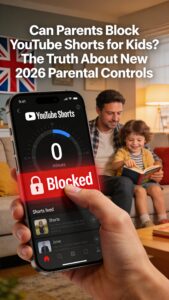
A viral Facebook post from “HeavenOf Tips” claims parents can now “block all Shorts content for their children” on YouTube. Is it true? Yes – but only for supervised child and teen accounts, and it’s done through a daily time limit you can set to zero. This January 2026 update gives families in the UK and worldwide more control over addictive short-form video scrolling, but it’s not a universal kill switch for every YouTube profile.
In this in-depth guide, we’ll break down the new YouTube parental controls for Shorts, how to set them up, their limitations, and tips for ultimate child online safety. Perfect for UK parents worried about screen time, YouTube addiction, and keeping kids safe online.
YouTube announced these features on January 14, 2026, targeting supervised accounts for kids under 13 and teens (13-17). The star feature: a Shorts-specific daily timer. Parents can cap how long a child spends in the Shorts feed – and set it to zero minutes to fully block access.
Additional tools include custom “Bedtime” and “Take a Break” reminders, plus easier account switching in the app so parents don’t accidentally let kids into adult feeds (and ruin their algorithm with Peppa Pig). These build on existing Family Link supervision, where parents approve apps, content, and screen time.
“This is an industry-first feature that puts parents firmly in control of the amount of short-form content their kids watch.” – YouTube Blog
Why now? Shorts exploded in popularity, mimicking TikTok’s endless scroll. Studies show short-form videos boost dopamine hits, leading to addiction-like habits in kids. UK regulators like Ofcom have pushed platforms for better safeguards under the Online Safety Act.
Pro Tip: For under-13s, use YouTube Kids app – it has no Shorts feed by default, but check settings as features evolve. Test on your device first!
Early reviews from TechCrunch and Engadget confirm the timer blocks the Shorts shelf and feed entirely when set to zero – no more infinite scrolling. Kids can still watch long-form videos like educational content from Khan Academy.
However, savvy teens might switch accounts or use incognito mode. Reddit parents report mixed success: “Great for little ones, but my 15-year-old found workarounds.” Combine with router controls for Wi-Fi blocking at bedtime.
| Feature | Works For | Limits |
|---|---|---|
| Shorts Timer to Zero | Supervised kids/teens | Only feed; Shorts in search may appear |
| Bedtime Reminders | All supervised accounts | Nudges, doesn’t force lock |
| Account Switching | Family Link users | Requires remembering to switch |
Big caveat: These controls are only for supervised accounts. Adult profiles? No native block – use browser flags like “not interested” or extensions. Kids on unmanaged accounts slip through.
Shorts still pop up in searches, recommendations, or channels. It’s time-based, not a full content filter. For total block, layer with YouTube Kids, parental apps like Qustodio, or home router settings (e.g., block youtube.com/shorts).
UK families: Under 13? COPPA rules mandate kid-safe defaults. Teens? Ofcom expects platforms to prevent harm. This update helps, but isn’t foolproof.
Shorts = TikTok clones: 15-60 second videos optimized for bingeing. A 2025 study by Digital Wellness Lab found kids average 90+ minutes daily, linked to sleep issues, anxiety. UK parents report “zombie scrolling” ruining homework.
YouTube’s response promotes “high-quality” recs like TED-Ed, but algorithms favor viral Shorts. New principles guide creators toward enriching teen content.
Beyond YouTube: Set device passcodes, review app downloads weekly, teach “pause and think” before sharing. Use Internet Watch Foundation for reporting harms. Balance with offline play.
Want more? Check our guides on YouTube Kids vs Regular YouTube and Wi-Fi Parental Controls.
YouTube’s 2026 Shorts controls are a win for supervised families – finally, a way to block the scroll. But pair with supervision, rules, and tech stacks for real protection. Kids deserve the digital world without the pitfalls.
Update your Family Link today and set Shorts to zero. Your child’s focus will thank you.
Related Reading:
Share this: Help UK parents master YouTube safety! #YouTubeShorts #ParentalControls #ChildSafety