Physical Address
304 North Cardinal St.
Dorchester Center, MA 02124
Physical Address
304 North Cardinal St.
Dorchester Center, MA 02124

Your Go-To for Digital Advice
Your Go-To for Digital Advice
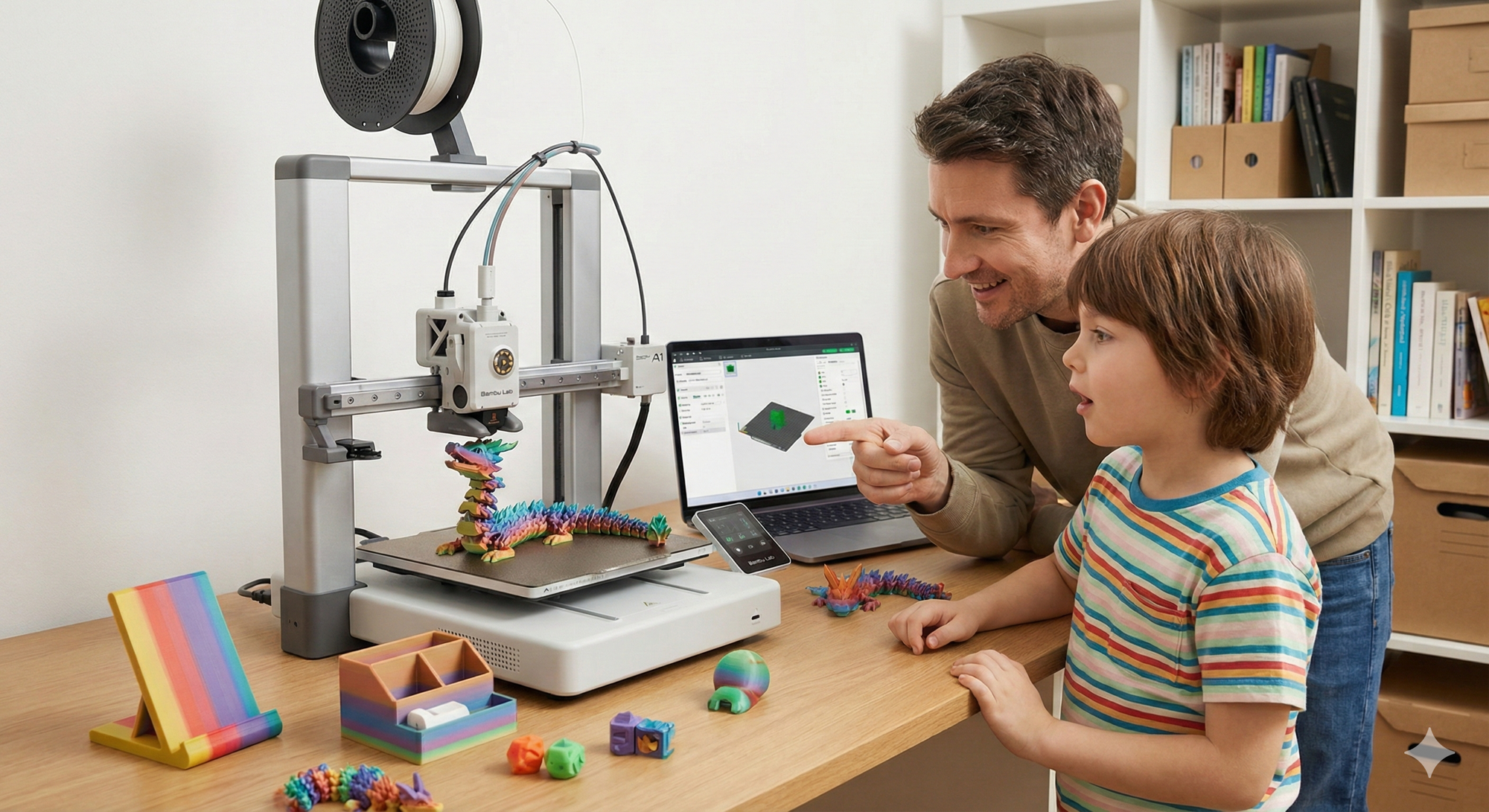
If you’re reading this as a parent, one of two things has likely happened:
This was me, five minutes before I started researching 3D printers. I knew nothing about them. Fast forward two months, and I’ve got a Bambu Lab A1 running day and night, kids choosing prints like it’s Netflix, my garage slowly filling up with useful, ridiculous, and genuinely impressive things, and a marriage proposal from my wife to start a printing business (she’s joking, probably).
Want a clear, jargon‑free answer right now? Ask our free AI tech chatbot for UK parents about Roblox, TikTok, screen time and more in seconds – try it here.
Here’s what I’ve learned: 3D printing isn’t complicated, it’s not as scary as it sounds, and it’s absolutely worth the investment if your kid keeps asking about it. This guide is for parents who feel overwhelmed. I’ve done the hard work so you don’t have to.
Short answer: Yes—with the right printer and the right expectations.
My daughter is 7 years old. She’s fascinated by the printer. She loves choosing what to print, comes home excited to see if it’s finished, and genuinely engages with the entire process. But—and this is important—she doesn’t run it alone. Nor would I expect her to.
The reality: This isn’t a “set it loose and walk away” toy. It’s more like power tools or baking—brilliant together, not solo at first.
Six months before I bought my printer, I watched a video that said: “It doesn’t put a foot wrong.”
That sounded like marketing fluff. It absolutely wasn’t.
I’ve now been printing for nearly two months, day and night without pause, and I’ve had zero real issues. No constant tinkering. No endless calibration. No frustration. It just works—which, as a parent with limited patience for technical troubleshooting, matters more than anything else.
If you’re starting out, I genuinely fail to see how the A1 would disappoint anyone. It’s not affiliated hype—I paid for everything myself.
| Model | Price | Build Area | Best For |
|---|---|---|---|
| Bambu Lab A1 Mini | Around £149 | Smaller (256 × 256 × 256 mm) | First-time users, limited space |
| Bambu Lab A1 (Full Size) | Around £259–£319 | Same as Mini but more power | Serious hobbyists, larger projects |
For most families, the A1 Mini is excellent value if space or budget is limited. The full A1 is worth the extra investment if you can accommodate it.
View current Bambu Lab A1 pricing on the official UK store →
This is something nobody talks about until they’ve got a printer running at 2 AM.
3D printers are:
Mine started in the kitchen. It didn’t stay there.
At daytime print speeds, the noise is manageable—you’ll barely notice it in another room. But overnight prints? That’s a different story. The mechanical sounds—motors, fans, bed movement—can be genuinely irritating when you’re trying to sleep.
Eventually, I moved mine to the garage and built a simple enclosure around it to keep out dust. Problem solved. The noise dropped significantly, the temperature stabilized, and everyone slept better.
This is where it gets genuinely fun.
So far, I’ve printed:
At some point, will I have printed enough marble runs and dragons? Maybe. But right now I’m sorting my garage and absolutely loving it. The possibilities are genuinely endless.
Your kids will surprise you with what they want to print. Things you’d never think of. Things that take 37 hours and come out absolutely brilliant. Things that fail at hour 36 and teach resilience and problem-solving.
This is the big parent question—and the answer is surprisingly simple.
Bambu Handy App
MakerWorld (by Bambu Lab)
You don’t need to understand file types, but for reference, most files are .stl files (Stereolithography format). You simply drop them into Bambu Studio software (the free desktop application), and it instantly tells you if they’re compatible with your printer.
I’ve printed files from outside Bambu’s ecosystem—Thingiverse, Printables, community uploads—and haven’t had a single compatibility issue with the A1. It’s remarkably forgiving.
Paid files exist on Etsy and through independent Patreon creators. Honestly? I haven’t paid for a single file yet. The free options are so comprehensive that paid alternatives rarely offer better value for beginners.
That said, some creators offer premium designs with better engineering, detailed instructions, or exclusive kits. If you find a creator whose work you love, supporting them is worth it.
This is where most parents brace themselves. The good news? It’s much less expensive than you think.
| Setup Type | Components | Total Cost |
|---|---|---|
| My Setup | A1 printer (~£259) + AMS Lite (~£89) + Starter filament (~£30) | Around £330–£350 |
| Budget-Conscious | A1 Mini (~£149) + Starter filament (£20–£30) | Under £200 |
| Full Package | A1 Combo (includes AMS) (~£319) + Extra filament (£50–£80) | Around £370–£400 |
Is it a big outlay? Yes. Is it worth it? Completely. Spread across years of daily printing, the cost-per-print is negligible.
PLA Filament is the beginner-friendly standard—non-toxic, biodegradable, and easy to print.
My buying strategy: I purchase directly from Bambu Lab’s website. Once you approach 6 rolls, the price drops significantly—making each roll work out at just over £10.
Real-world comparison:
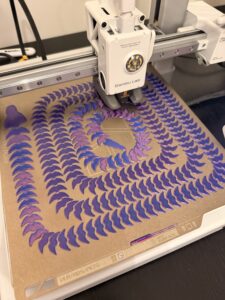
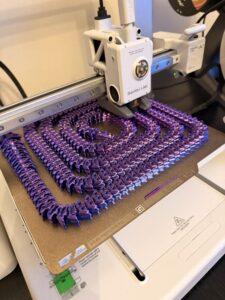
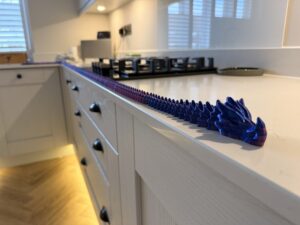
The value proposition is astonishing.
I worried about power consumption. Here’s the reality: Electricity costs are practically negligible. A typical FDM printer running continuously uses about 500–700 watts. Even printing 24/7, the monthly energy cost is minimal.
Bottom line: Don’t factor electricity into your decision. It’s not a meaningful expense.
I’ve had exactly one failed print—caused by a power cut.
That’s it. In nearly two months of continuous printing.
The Bambu Lab A1’s reliability is genuinely exceptional. Older consumer printers might fail 10–20% of prints if you’re unlucky. The A1 has essentially eliminated this problem through intelligent sensors and automatic compensations.
This is an important decision point.
Short answer: Only if you want multi-color prints within single objects.
The AMS (Automatic Material System) Lite:
Cost: ~£89 for the AMS Lite
Value proposition: If you and your kids enjoy multi-color projects, it’s worth every penny.
If you don’t want an AMS, you have two options:
Option 1: Multi-color filament rolls
Option 2: Manual filament swaps
Honestly? The manual swap approach is brilliant for kids because they understand why the colours change and how the printer works.
There’s free software available for Windows and Mac called Bambu Studio.
Even as a complete beginner, I’ve been able to:
This alone adds loads of fun and engagement.
All completely free. No subscriptions. No hidden costs. No premium features locked behind paywalls.
The software is a genuine differentiator for Bambu Lab compared to competitors.
This is the question every parent asks.
Surfaces that get very hot:
Moving parts:
These require supervision and respect.
I was genuinely surprised by how low-maintenance the A1 is.
Routine maintenance:
I’ve had no clogging, no jams, no breakdowns. The engineering is genuinely excellent.
That’s genuinely it. Simple rules, easily understood, keeps everyone safe.
This is worth discussing honestly. FDM 3D printers release:
Research status: Studies from EPA and academic institutions show these emissions can affect indoor air quality. Most concern focuses on long-term exposure in enclosed spaces with vulnerable populations (children, people with respiratory conditions).
Risk mitigation:
My approach: My printer lives in the garage with a simple box around it. The space is ventilated, and the noise is contained. I’m comfortable with this setup.
Note: Most research concerns focus on ABS filament. PLA (which we use) appears to be lower-risk, though still worth proper ventilation.
If you have concerns about respiratory health or your child has asthma, consult the research and make an informed decision. This isn’t something to ignore—but with proper setup, it’s manageable.
This is genuinely brilliant and deserves special attention.
On MakerWorld, you can buy kits that include:
Cost: £10
Includes: Marbles + small USB motor
Your responsibility: Print all the parts
Result: You build an impressive motorised marble run together
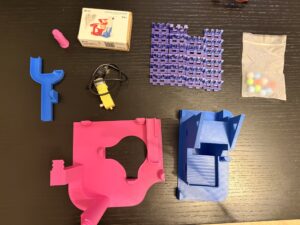
For £10, watching something come to life with your child—engineering, assembly, problem-solving—is fantastic value. Kids genuinely get excited when they realise they made all the parts themselves.
Browse MakerWorld kits for inspiration →
| Setup Type | Costs | Year 1 Total |
|---|---|---|
| Budget Setup | A1 Mini (£149) + Starter filament (£30–£40) + Electricity (~£10) | ~£189–£199 |
| Solid Hobbyist | A1 Full (£259) + AMS Lite (£89) + Filament (£40–£60) + Year 1 filament (£100–£150) + Electricity (~£20) | ~£508–£578 |
| Everything Included | A1 Combo (£319) + Extra filament (£80–£100) + MakerWorld kits (£30–£40) + Replacement parts (£10–£15) + Enclosure (£30–£50) + Year 1 filament (£150–£200) + Electricity (£30) | ~£649–£754 |
Total ongoing annual cost: £185–£330/year
Consider what you’d normally spend:
A single 3D printer replacing purchases like these pays for itself within 6–12 months. After that, everything is essentially cost-free (plus minimal filament).
While I’m genuinely not affiliated with Bambu Lab, I should mention alternatives for context.
What they offer: Solid, budget-friendly options
Why people like them: Lower initial cost, large community support
Reality check: Slightly less polished software, more tinkering required, higher failure rates than Bambu Lab
Verdict: If budget is extremely tight, Creality offers decent value. But you’ll spend more time troubleshooting and less time printing with your kids.
Various manufacturers exist, each with merits. The premium consumer space tends to be dominated by Bambu Lab due to their combination of:
If you’re starting out, the Bambu Lab A1 range remains the best value proposition in consumer 3D printing. Check the UK complete guide to best 3D printers 2025 for detailed comparisons with other top options.
Most successful prints are either:
The least successful prints are random “cool things” adults think kids might like. Kids are picky—they want what they imagine, not what algorithms suggest.
My wife loves it. We’ve had genuine family conversations about what to print next. My 80-year-old mum found it fascinating. The neighbours stop by to watch prints happening. The kids actually choose screen time less because they’re excited about prints finishing.
Will we print everything forever? No. At some point, the novelty wears off—for a while. But what remains is a tool that turned imagination into physical objects. That’s genuinely powerful.
If you’re reading this feeling overwhelmed—don’t worry. You’re exactly where I was.
The decision to buy a 3D printer for your family doesn’t need to be complicated. Here’s the simple truth:
“Will my kid actually use it?” – That depends on them, not the printer. But if they’ve been asking about it, the answer is usually yes.
Sometimes you just have to be the brave parent and click “order.” I’m genuinely glad I did.
| Question | Answer |
|---|---|
| Is a 3D printer good for kids? | Yes, with proper supervision and realistic expectations. |
| Best printer for beginners? | Bambu Lab A1 or A1 Mini – incredibly reliable and user-friendly. |
| How much does it cost? | £150–£350 upfront; £150–£250/year ongoing for filament. |
| Is it safe? | Yes, with proper setup, ventilation, and supervision. |
| Will my kid actually use it? | If they’ve been asking about it—almost certainly yes. |
| How much do prints cost? | £0.01–£0.10 per item (mostly filament cost). |
| What should we print first? | Let your kid choose – that’s where the magic happens. |
Ready to take the plunge? Start with the Bambu Lab A1 Mini if budget is tight, or the full A1 if you have space. Either way, you’re making an excellent decision.